- Position Along Line: along the angle specified by the current position and target values
- Position: source location for the spotlight
- Hotspot: adjusts the angle of the hotspot
- Target: changes the position of the target location
- Target Along Line: target of the spotlight along the angle specified by the current position and target values
- Falloff: adjusts the angle of the falloff
Friday, May 28, 2010
Editing Spotlights
Sunday, May 23, 2010
Common Light Properties
Name: Displays the name of the light in the scene
Type: Switches between point and spotlight lights
On/Off Status: Turns light on or off in the scene
Shadows: Toggles whether shadows are calculated for the light that the light casts 投射
Intensity Factor: Specifies the brightness of the light
Filter Color: Specifies the color light that the light emits
The three main types of lights, Point, Spotlight, and Distant light, share some common properties
Changing these properties has the same effect regardless of the type of light
Light Glyphs
Turning Off Default Lighting Mode
Light Panel
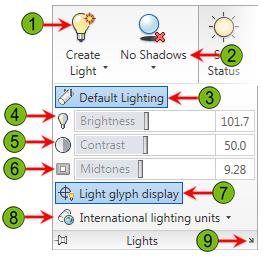
- Create a Point/Spot light: Starts the Light command with the Point or Spot option
- Shadows: Controls whether Full, Ground or No shadows are displayed
- Default Lighting Mode: Turns default lighting on and off. Default lighting must be turned off before you can use lights and the sun when rendering
- Brightness Slider: Controls the brightness of all the lights in the scene by a given factor; typically used with default lighting
- Contrast Slider: Controls the contrast of all the lights in the scene by a given factor; typically used with default lighting
- Midtones Slider: Controls the midtone values for exterior scenes that are lit by the sun. This slider is only available when the LIGHTINGUNITS system variable is set to 1 or 2
- Light Glyph Display: Turns on and off the display of the glyphs in the drawing that represent the location of point lights and spotlights
- Units: Controls whether Generic units, American units (generic) or SI units (photometric) lights are used
- Lights in Model: Displays the Lights in Model palette on which you can select lights in the scene and display their properties on the Properties palette
Distance Light
Emits 射出 light uniformly in a single direction based on a From and a To vector

Distant lights are good for filling a scene with an even amount of light, like Sun Light
Subscribe to:
Posts (Atom)